
DXPR Builder vs Drupal Gutenberg.
Your next campaign needs a page your team can shape. Compare DXPR’s visual page-building workspace with the Gutenberg block editor for Drupal.
Start with the page your team needs to make.
A product launch asks more of an editor than a text update. Look at how authors build the layout, adapt it for mobile and refine the message.
When DXPR fits
Choose DXPR when marketers need ready-to-use layout and content elements, inline editing and AI assistance in one visual page-building experience.
When Gutenberg fits
Consider Gutenberg when your team prefers its block-editing approach. The Drupal module supports reusable blocks, Drupal blocks and configurable restrictions on editing flexibility.
What changes for your team?
Scroll horizontally to compare both tools. Keyboard users can focus the table and use the arrow keys.
| Your decision | DXPR Builder | Drupal Gutenberg |
|---|---|---|
| Editing experience | Edit text on the page and arrange DXPR Builder elements visually. | Compose content through the Gutenberg block editor adapted for Drupal. |
| Reusable starting points | Save pages and sections as templates for the next campaign. | Save and reuse blocks within the editor. |
| Drupal content | Place existing Drupal blocks and Views in DXPR Builder content. | Supports Drupal blocks and mapping content to content-type fields. |
| Layout control | Author responsive rows and columns with DXPR Builder’s layout settings. | Configure the available blocks and fixed layouts for your authors. |
| AI workflow | Generate a page, refine it in chat and edit the result visually. | Evaluate the AI extensions and workflow in your selected setup. |
| Budget and setup | Free and paid plans; compare current author allowances and AI credits. | Community module; allow for configuration, theming and ongoing maintenance. |
Reviewed 24 September 2026 against Gutenberg project. Extensions and site configuration can change the experience. See current DXPR plans for pricing and allowances.
Let the author work on the page.
Headlines, links and layout changes belong in the same working session. DXPR combines direct visual editing with reusable page elements, so marketers can keep shaping the campaign as the brief evolves.
Try changing a heading, adding a call to action and adjusting a section. The useful comparison is how confidently your authors can finish that work.
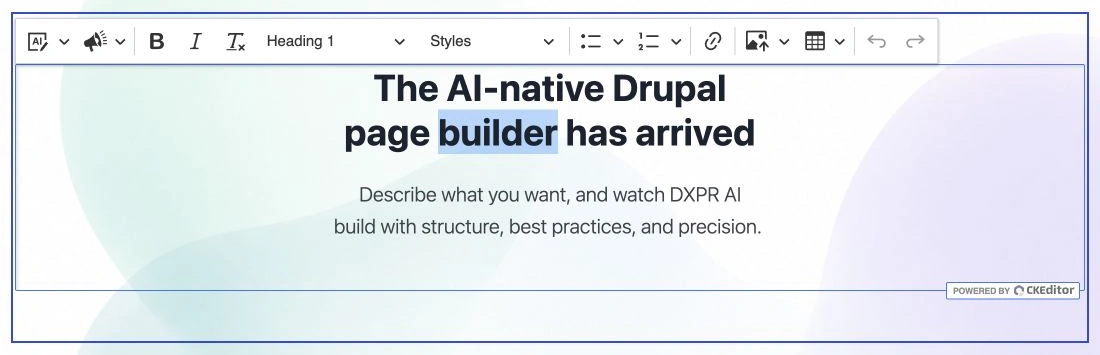
Actual DXPR Builder interface: editing a headline directly in its page layout.
Compare them on a real piece of work.
Bring an author, a platform owner and one page you actually need to publish.
Build the same campaign
Use the same brief, content and design in each editor. Include a hero, a two-column section and a clear call to action.
Make the late change
Ask an author to shorten the heading, move a section and review the mobile result.
Prepare the handover
Save the useful parts for reuse and check what a second author can change without developer help.
Before you decide.
Still weighing your options?
Explore another comparison, or see how DXPR can modernize your existing Drupal platform.
Let your next page
make the case.
Try the editing experience yourself, or bring your current Drupal setup to a conversation with our team.