
DXPR Builder vs Drupal Layout Builder.
Keep the Layout Builder layouts your team has invested in. Add DXPR’s visual editing and AI inside them, with the workflows and translations your site already uses.
Page structure and content creation can work together.
Your site builders need control of the overall page. Your marketers need a better way to create what goes inside it. These responsibilities can share the same Drupal foundation.
When DXPR fits
Choose DXPR for the authoring workspace: inline text editing, responsive content layouts, reusable sections and AI-assisted drafting.
When Layout Builder fits
Use core Layout Builder to arrange fields and blocks, define default displays and make individual layout overrides. It also supports custom inline blocks.
What changes for your team?
Scroll horizontally to compare both tools. Keyboard users can focus the table and use the arrow keys.
| Your decision | DXPR Builder | Drupal Layout Builder |
|---|---|---|
| Primary scope | Visual composition inside a DXPR Builder-enabled content field. | Entity display layouts, fields and blocks. |
| Authoring tools | Inline editing, ready-to-use elements and AI assistance. | Drag-and-drop sections, block placement and block configuration. |
| Reusable structure | Save a page or section as a DXPR Builder template. | Define content-type defaults and individual layout overrides. |
| Language-specific layout | Each translated DXPR Builder field can have its own internal content layout. | Core layout overrides are shared across translations. |
| Using them together | Place a text field using the DXPR Builder formatter in the existing layout. | Keep ownership of the surrounding page structure and blocks. |
| Licensing and setup | Free and paid DXPR Builder plans; configure fields and editor permissions. | Included in Drupal core; configure layouts and available blocks. |
Reviewed 24 September 2026 against Layout Builder overview · Layout Builder translation guide. Extensions and site configuration can change the experience. See current DXPR plans for pricing and allowances.
Your Drupal content stays part of the page.
Use existing Drupal blocks and Views alongside DXPR Builder elements. Your development team’s work can stay useful while editors gain direct control over the campaign content.
Enable DXPR Builder on a text field and place that field in your Layout Builder layout. Drupal continues to provide the permissions, revisions, moderation and translations around the editing experience.
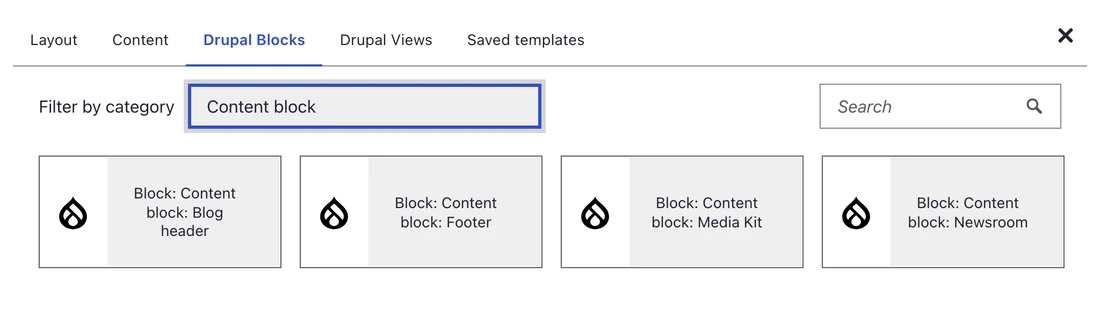
Actual DXPR Builder interface: choosing existing Drupal blocks for page content.
Compare them on a real piece of work.
Bring an author, a platform owner and one page you actually need to publish.
Keep an existing layout
Choose a real Layout Builder page with the fields and blocks your organization uses.
Add the editing workspace
Place a text field using the DXPR Builder formatter in that layout. Give the relevant roles permission to edit.
Run the whole campaign
Create and refine the content, review a language version and take it through your configured publishing workflow.
Before you decide.
Still weighing your options?
Explore another comparison, or see how DXPR can modernize your existing Drupal platform.
Let your next page
make the case.
Try the editing experience yourself, or bring your current Drupal setup to a conversation with our team.