
Workflow states
A workflow state is one named stage in a Drupal workflow, such as Draft, Published or Archived. Content Moderation gives each state a published flag.
In Drupal, a workflow state is where an item currently sits in its workflow. Each state has a machine ID, a label and a weight that sets its order. Under Content Moderation, which applies workflows to content, a state also decides whether content in it is published and whether it becomes the default revision that visitors see.
How workflow states work in Drupal 11
States belong to a workflow. The workflow type plugin stores them and offers methods to add, read and delete them. StateInterface describes a state: its ID, label and weight, and the transitions that lead out of it. Core marks the interface as internal: only Workflows and Content Moderation should use it, so contributed code should not build on it.
Content Moderation wraps a state in ContentModerationState, which adds two methods: isPublishedState() and isDefaultRevisionState(). They match the two checkboxes on the state form, Published and Default revision. The form notes that the default revision flag is implied for published states. For the two states the type requires, Draft and Published, both checkboxes are disabled.
Open the workflow at Configuration › Workflow › Workflows and use its add-state form, at /admin/config/workflow/workflows/manage/{workflow}/add_state. It asks for a State label. The workflow settings also hold a Default moderation state. New content starts there, and its edit form offers the transitions that lead out of it.
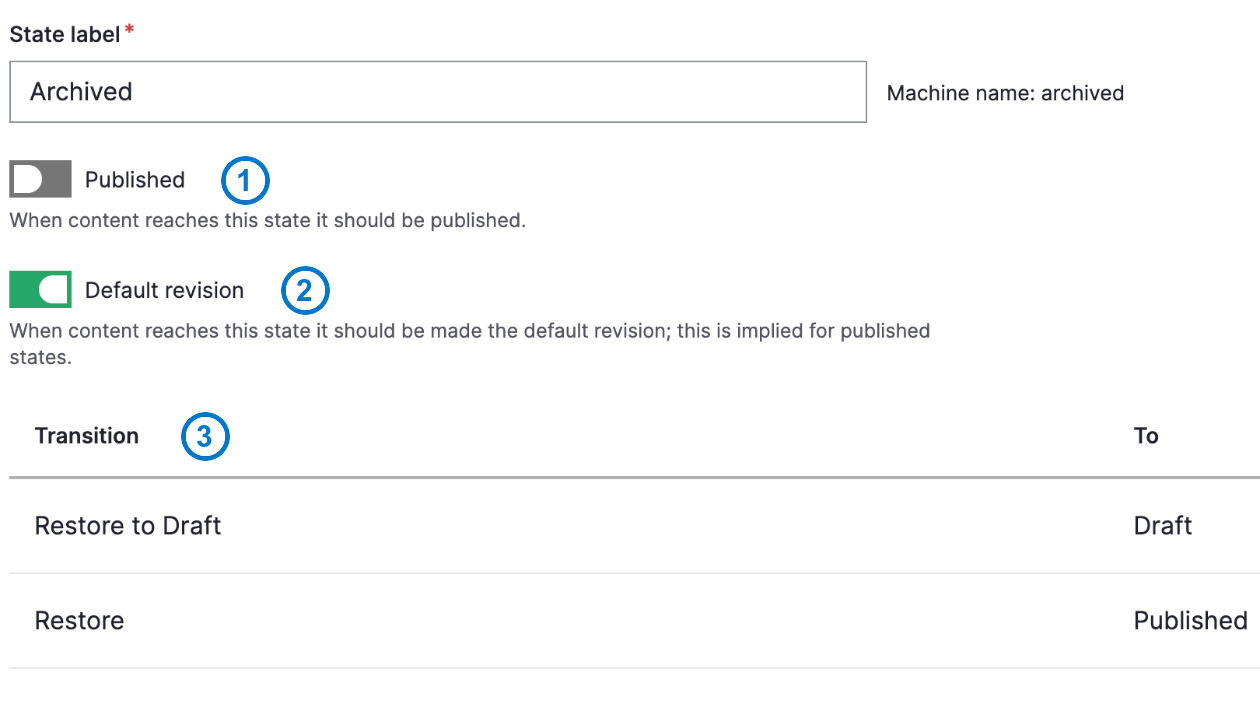
The Archived state of the Editorial workflow, shown in the Gin administration theme: (1) Published is off, so the state is not published; (2) Default revision is on, so archiving replaces the live version; (3) the transitions that leave this state.
Example
The Editorial workflow from the Standard profile defines three states:
- Draft: not published, not the default revision. A draft saved on a live page is a pending revision, and visitors keep seeing the published version.
- Published: published and the default revision.
- Archived: not published, but the default revision. Archiving a page replaces the live version with an unpublished one.
That last combination is why the Drupal.org documentation says you archive an item to unpublish it under the default workflow.
Common mistakes
- Making a review state the default revision. The Drupal.org documentation warns that a Needs review state must not be a default revision, and that the transition into it must not start from Published. Otherwise published content becomes inaccessible.
- Deleting a state that content still uses. Drupal shows that the state is in use and does not let you remove it until the content has moved.
- Forgetting what a delete removes. Deleting a state also deletes the transitions that lead to it, and removes it from the start of others.
For marketing and content teams
States are the vocabulary of your editorial process. Keep the list short, and name each state for what it means to your team: Draft, In review, Published, Archived. Before you ask for a new state, decide whether content in it should be visible to visitors, and whether it should replace the live version. Those two answers set the flags. See content moderation for how a state changes what visitors see.
Sources
- Drupal.org: Content Moderation overview
- StateInterface, Drupal API
- ContentModerationState, Drupal API
- WorkflowTypeInterface, Drupal API
- Editorial workflow of the Standard profile, Drupal core source (11.4.x)
- ContentModerationStateForm, Drupal core source (11.4.x)
- ContentModerationConfigureForm, Drupal core source (11.4.x)
- WorkflowAccessControlHandler, Drupal core source (11.4.x)
- WorkflowStateDeleteForm, Drupal core source (11.4.x)
- WorkflowTypeBase, Drupal core source (11.4.x)
Questions about workflow states
Cite this definition
"Workflow states." DXPR Drupal glossary, https://dxpr.com/hc/documentation/learn-drupal/drupal-glossary/workflow-states. Last updated October 28, 2026.