
DXPR Builder vs Drupal Canvas.
Your team needs easier editing and AI. Your Drupal platform already does a lot right. Compare how DXPR Builder and Drupal Canvas fit your pages, components and publishing workflows.
Proven in enterprise Drupal. Ready for your next campaign.
For years, enterprise clients have used DXPR with their Drupal approval workflows, multilingual publishing and complex user permissions. Give your marketers visual editing and AI backed by that experience.
When DXPR fits
You want visual editing and AI inside an established Drupal site. Keep your Layout Builder layouts, reuse Drupal blocks and let local teams adapt content and layouts within translated DXPR Builder fields.
When Canvas fits
You are choosing a component-based site-building approach. Canvas offers visual composition with Single Directory Components and code components, with tooling for pages, content templates and full-page templates.
Compare the work behind the demo.
Canvas is a stable, actively developed Drupal project. This comparison uses its 1.11.0 release and documented workflows as the reference, checked on 24 September 2026.
Scroll horizontally to compare both tools. Keyboard users can focus the table and use the arrow keys.
| Your decision | DXPR Builder | Drupal Canvas |
|---|---|---|
| Drupal version | Supports Drupal 10 and 11; check the requirements of your selected release. | Canvas 1.11.0 requires Drupal 11.3 or later within Drupal 11. |
| Editorial approval | Works with Drupal’s permissions, revisions and configured moderation around the DXPR Builder content field. | The Drupal CMS guide currently says workflows are not available for Canvas pages. Review this requirement before adopting Canvas for a moderated site. |
| Editing scope | Compose content visually inside a DXPR Builder-enabled text field, including a field placed in Layout Builder. | Compose pages and manage content templates and full-page templates in Canvas. |
| Existing Layout Builder investment | Keep the surrounding layout and add DXPR’s editor within its content area. | The Layout Builder migration work is still marked “Needs work.” Assess the conversion of your existing layouts and components. |
| Reusable building blocks | Start with DXPR Builder elements and templates; reuse Drupal blocks and Views. | Use a component library, including Drupal Single Directory Components and code components. |
| Layouts across languages | Each translated DXPR Builder field can have its own content and internal layout. | The documented translation workflow shares component structure across languages and translates component inputs. |
| AI-assisted creation | Create and refine page content with DXPR Builder’s integrated AI tools. | Canvas AI can assemble pages from existing components or generate code components; an AI provider must be configured. |
| Cost and implementation | Free and paid plans. Include field setup, theme integration, support and AI allowances in your evaluation. | Open-source Drupal project. Include component work, integration, maintenance and AI provider costs in your evaluation. |
Reviewed 24 September 2026 against the Canvas project, component documentation, AI assistant guide and translation guide. Also checked: Canvas 1.11.0, Drupal CMS workflow guide and Layout Builder migration issue. Capabilities depend on release, extensions and configuration. See current DXPR plans for pricing and allowances.
Give every market room to make the page work.
A local campaign may need a different story, a different order or a different call to action.
DXPR uses Drupal’s field translations, so each language can have its own DXPR Builder content and layout. Local editors can adapt the page while working within your Drupal publishing setup.
Canvas documents a shared component structure across languages. If local layout freedom matters to your organization, make it part of the trial.
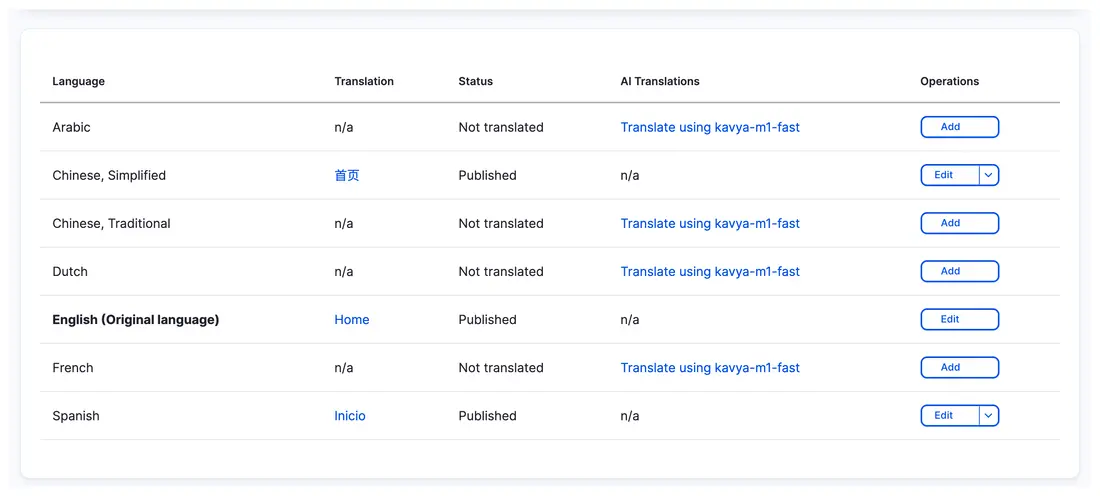
DXPR works with Drupal’s language versions. Open a translation to edit its DXPR Builder content.
Bring your real publishing workflow.
A convincing trial ends with a page your team could actually publish.
Build with what you have
Choose an existing campaign layout, approved components and a real content brief. Compare what editors can reuse and what a developer needs to prepare.
Take it through approval
Use your actual author and reviewer roles. Test revisions, access rules and your configured moderation workflow, including Workbench where you use it.
Publish for another market
Create a language version, adapt the structure and check RTL where needed. If you use AI, include provider connections and data handling in your platform review.
Before you decide.
Still weighing your options?
Explore another comparison, or see how DXPR can modernize your existing Drupal platform.
Let your next page
make the case.
Try the editing experience yourself, or bring your current Drupal setup to a conversation with our team.